


















Cấu Hình VPN IPSEC LAN TO LAN
Network Site 61
Site 155 #
| Hostname | fw155 |
| WAN IP | |
| LAN Net | 192.168.56.0/24 |
| LAN IP | 192.168.56.254/24 |
| LAN DHCP Range |
Firewall Rules Site 61 & Site 155 : #
Để cho phép kết nối Tunnel IPsec, các yêu cầu sau đây phải được cho phép trên WAN cho các địa điểm trên site: (under Firewall ‣ Rules ‣ WAN):
- Protocol ESP
- UDP Traffic on Port 500 (ISAKMP)
- UDP Traffic on Port 4500 (NAT-T)

Note
Bạn có thể giới hạn địa chỉ IP nguồn của máy chủ từ xa.
Bước 1 – Phase 1 Site 61 #
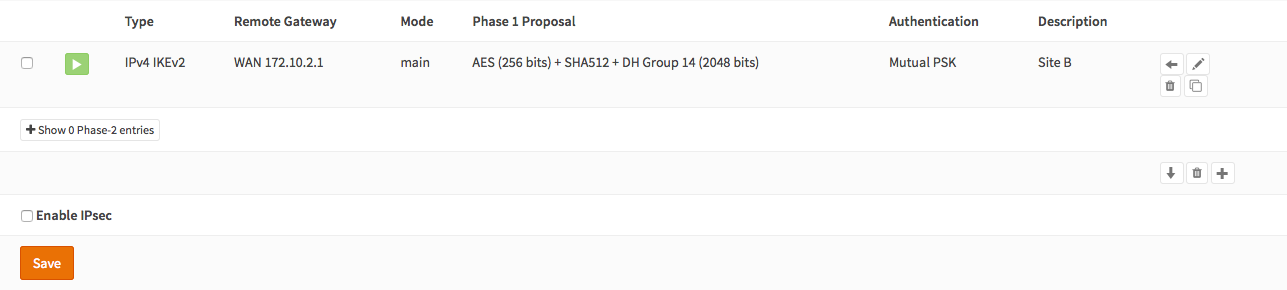
(Dưới VPN ‣ IPsec ‣ Cài đặt Tunnel Nhấn +) Chúng ta sẽ sử dụng các cài đặt sau:
General information #
| Connection method | default | default is ‘Start on traffic’ |
| Key Exchange version | V2 | |
| Internet Protocol | IPv4 | |
| Interface | WAN |
Hãy chọn giao diện được kết nối với internet. |
| Remote gateway | the public IP address of your remote OPNsense | |
| Description | Site 155 | Gõ thông tin dễ nhớ |
Phase 1 proposal (Authentication) #
| Authentication method | Mutual PSK | Using a Pre-shared Key |
| My identifier | My IP address | Simple identification for fixed ip |
| Peer identifier | Peer IP address | Simple identification for fixed ip |
| Pre-Shared Key | At4aDMOAOub2NwT6gMHA | RANDOM PASS |
Phase 1 proposal (Algorithms) #
| Encryption algorithm | AES | For our sample we will Use AES/256 bits |
| Hash algoritm | SHA512 | Use a strong hash like SHA512 |
| DH key group | 14 (2048 bit) | 2048 bit should be sufficient |
| Lifetime | 28800 sec | lifetime before renegotiation |
Advanced Options #
| Disable Rekey | Unchecked |
Thực hiện đàm phán lại khi kết nối sắp hết hạn. |
| Disable Reauth | Unchecked | Thực hiện đàm phán lại khi kết nối sắp hết hạn. |
| NAT Traversal | Disabled | |
| Dead Peer Detection | Unchecked |
SAVE LẠI

Như hình nhưng địa chỉ IP của mình
Bước 2 – Phase 2 Site 61 #
Ấn nút + trước mục phase 1 để thêm một phase 2 mới.
General information #
| Mode | Tunnel IPv4 | Select Tunnel mode |
| Description | Local LAN Site B | Freely chosen description |
Local Network #
| Local Network | LAN subnet | Route the local LAN subnet |
Remote Network #
| Type | Network | Route a remote network |
| Address | 192.168.56.0/24 | The remote LAN subnet |
Phase 2 proposal (SA/Key Exchange) #
| Protocol | ESP | Choose ESP for encryption |
| Encryption algorithms | AES / 256 | For the sample we use AES 256 |
| Hash algortihms | SHA512 | Choose a strong hash like SHA512 |
| PFS Key group | 14 (2048 bit) | Not required but enhanced security |
| Lifetime | 3600 sec |
Save your setting by pressing:
Enable IPsec for Site A, Select:

Save:
And Apply changes:


Bạn đã hoàn tất việc cấu hình Site 61 (chỉ còn lại một số cài đặt tường lửa, chúng ta sẽ xử lý sau). Bây giờ chúng ta sẽ tiếp tục thiết lập Site 155.
BƯỚC 3 – Phase 1 Site 155 #
(Dưới VPN ‣ IPsec ‣ Cài đặt Tunnel Nhấn +) Chúng ta sẽ sử dụng các cài đặt sau:
General information¶ #
| Connection method | default | default is ‘Start on traffic’ |
| Key Exchange version | V2 | |
| Internet Protocol | IPv4 | |
| Interface | WAN | choose the interface connected to the internet |
| Remote gateway | địa chỉ ip của wan 61 | |
| Description | Site 155 | freely chosen description |
Phase 1 proposal (Authentication)¶ #
| Authentication method | Mutual PSK | Using a Pre-shared Key |
| My identifier | My IP address | Simple identification for fixed ip |
| Peer identifier | Peer IP address | Simple identification for fixed ip |
| Pre-Shared Key | At4aDMOAOub2NwT6gMHA | giống ở trên |
Phase 1 proposal (Algorithms)¶ #
| Encryption algorithm | AES | For our sample we will Use AES/256 bits |
| Hash algoritm | SHA512 | Use a strong hash like SHA512 |
| DH key group | 14 (2048 bit) | 2048 bit should be sufficient |
| Lifetime | 28800 sec | lifetime before renegotiation |
Advanced Options¶ #
| Disable Rekey | Unchecked | Renegotiate when connection is about to expired |
| Disable Reauth | Unchecked | For IKEv2 only re-authenticate peer on rekeying |
| NAT Traversal | Disable | For IKEv2 NAT traversal is always enabled |
| Dead Peer Detection | Unchecked |
Save your setting by pressing:
Như hình nhưng địa chỉ IP của mình

Bước 4 – Phase 2 Site 155 #
Ấn nút + trước mục phase 1 để thêm một phase 2 mới.
General information¶ #
| Mode | Tunnel IPv4 | Select Tunnel mode |
| Description | Local LAN Site A | Freely chosen description |
Local Network¶ #
| Local Network | LAN subnet | Route the local LAN subnet |
Remote Network¶ #
| Type | Network | Route a remote network |
| Address | 192.168.61.0/24 | The remote LAN subnet |
Phase 2 proposal (SA/Key Exchange)¶ #
| Protocol | ESP | Choose ESP for encryption |
| Encryption algorithms | AES / 256 | For the sample we use AES 256 |
| Hash algortihms | SHA512 | Choose a strong hash like SHA512 |
| PFS Key group | 14 (2048 bit) | Not required but enhanced security |
| Lifetime | 3600 sec |
Save your setting by pressing:
Enable IPsec for Site B, Select:
Save:
And Apply changes:
BƯỚC 5: Firewall Rules Site A & Site B #
Để cho phép luồng dữ liệu đi qua đến mạng con LAN của bạn, bạn cần thêm một quy tắc vào giao diện IPsec (under Firewall ‣ Rules ‣ IPsec).

IPsec Tunnel Ready #
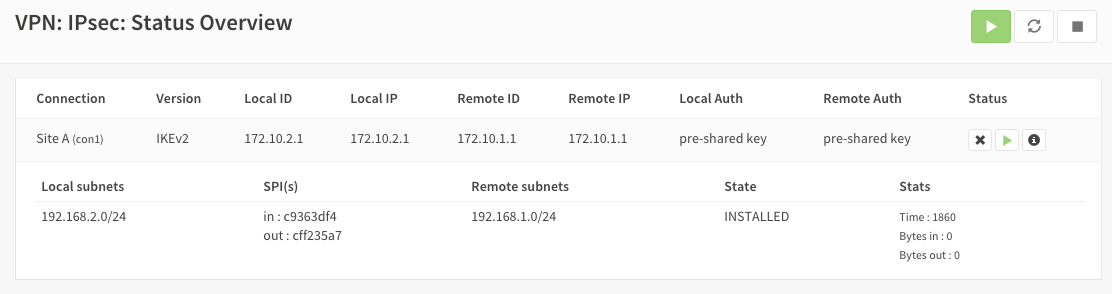
Hiện tại, đường hầm nên đã được kích hoạt và định tuyến cả hai mạng. Truy cập vào VPN ‣ IPsec ‣ Tổng quan Trạng thái để xem trạng thái hiện tại. Nhấp vào (i) để xem thông tin chi tiết về các đường hầm phase 2, như sau:
Lưu ý:
Nếu đường hầm không được kết nối, hãy thử khởi động lại dịch vụ ở cả hai đầu.


Được cung cấp bởi BetterDocs